Systems engineering

Physical Security Design Tools

Calculators and planning tools for access control, video surveillance, and network infrastructure.

Explore the tools

Solar Site Planner

See how seasonal shade affects solar output before sizing panels and batteries for remote security equipment.

Open Solar Site Planner

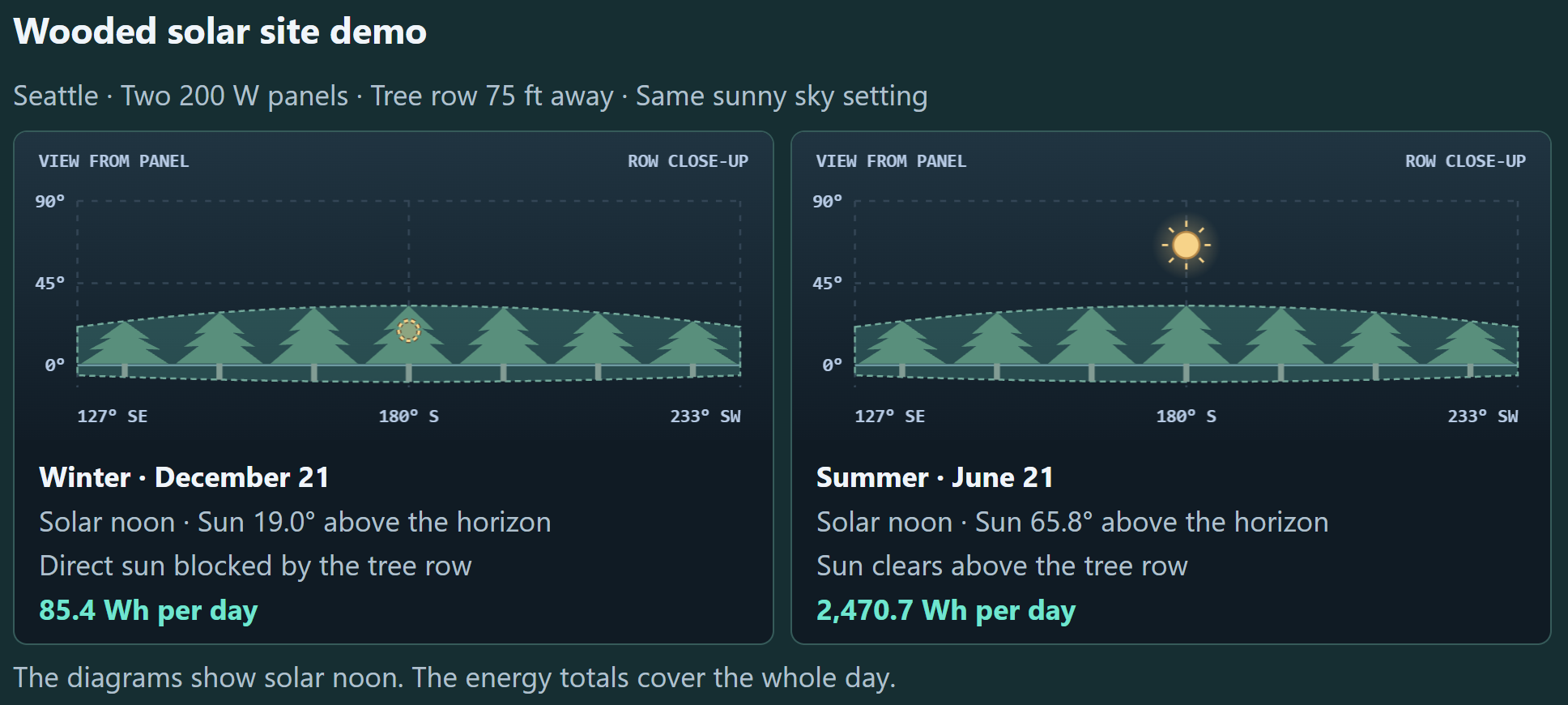
Same sunny-sky setting: 85.4 Wh/day in winter and 2,470.7 Wh/day in summer.

Wooded Seattle site with two 200 W panels and a tree row 75 feet away. At solar noon, trees block direct sun on December 21 and the sun clears the trees on June 21.

Free design tools for integrators and engineers, built by Todd Grace, RCDD.

Tool library

Design calculators

Remote power & solar

Solar Site Planner

Estimate whether a solar panel and battery can support remote security equipment through seasonal changes, shade, and site conditions.

Open tool

What you can check

  • Solar energyEstimate monthly production using location, panel size, and tilt.
  • Battery backupCompare the daily load with usable battery capacity and expected backup time.
  • Site conditionsAccount for shade, weather, soiling, and seasonal reductions.

Access control & credentials

Card Format Finder

Decode binary or hex Wiegand reads, compare possible card formats, and inspect field layouts and parity checks.

Open tool

What you can check

  • Possible formatsCompare a raw card read against known formats and decode facility codes and card numbers.
  • Bit layout & parityInspect field positions, check parity, and compare results with a known credential.
  • System configurationTest custom formats and export supported layouts as Genetec XML.

Access control & alarms

Weatherproof Enclosure Planner for Verkada Devices

Compare usable cabinet sizes, lay out equipment with mounting clearances, and estimate internal temperatures from equipment heat and airflow.

Open tool

What you can check

  • Equipment fitLay out up to four devices and reserve space for a 2-gang outlet.
  • TemperatureCompare passive and fan-running estimates.
  • Installer handoffPrint the layout, clearances, and any heat results you enter.

Video surveillance & storage

RAID Storage Calculator

Start with a target usable capacity, estimate how many drives you need, and see how data, parity, and mirrors are laid out.

Open tool

What you can check

  • Drive countSize an array for your capacity target and selected drive size.
  • CapacityCompare raw and usable capacity with the space displayed by Windows.
  • Drive layoutVisualize RAID 5, 6, 10, 50, and 60.

Network infrastructure & power

PoE Switch Budget Planner

Check whether a switch can power all your cameras, intercoms, and other PoE devices at once.

Open tool

What you can check

  • Port countCompare the number of PoE devices with the available PoE ports.
  • Per-port powerCheck each device’s power requirement against the switch’s per-port capability.
  • Total PoE budgetCompare the combined load with the switch’s rated PoE budget and see how much power remains.

Network infrastructure & power

Network Rack Designer

Place equipment, check fit, power, and bonding, and generate an order list.

Open tool

What you can check

  • Equipment fitLay out the front and rear elevations and check rack depth and clearances.
  • Power & UPSReview circuit loads and estimate UPS runtime.
  • Bonding & partsDocument bonding connections and export a bill of materials.

About aiWebDeck

Built for system design

I created aiWebDeck to give integrators and engineers free, practical tools for physical security design.

AI helped me structure the tools, write the code, and refine the interfaces. My experience in physical security and ICT design shapes what the tools check, how the calculations work, and what assumptions they use. I review the logic and assumptions before each tool goes live. For example, the Network Rack Designer checks whether equipment mounted at the front and rear can collide, even when each item fits on its own.
Was this site helpful?

Send feedback